
Page Fellow
See what each ad set’s traffic does after the click.
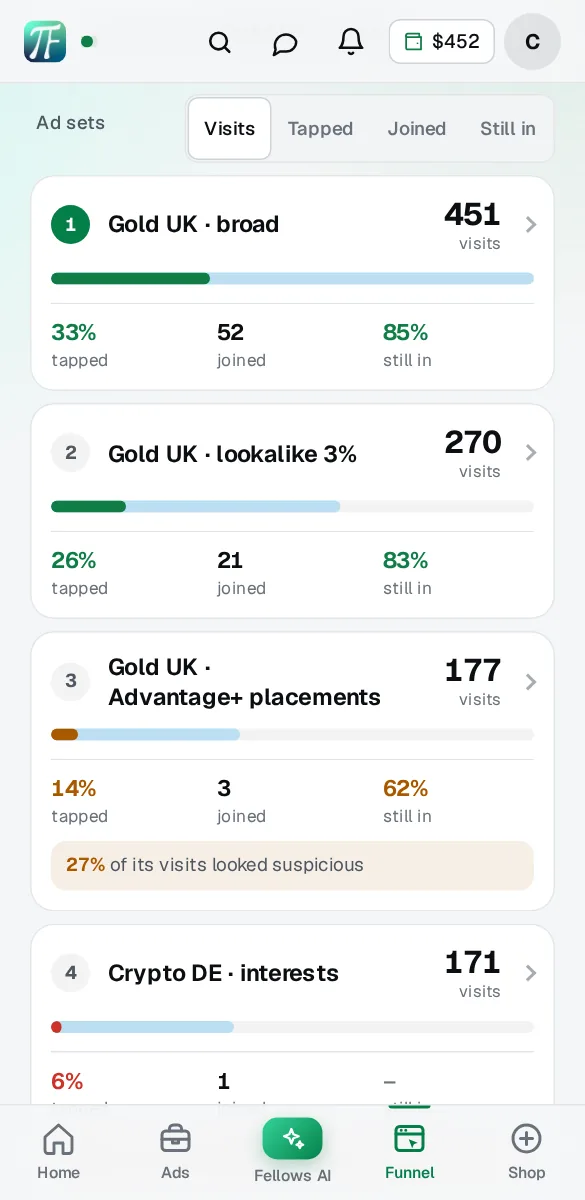
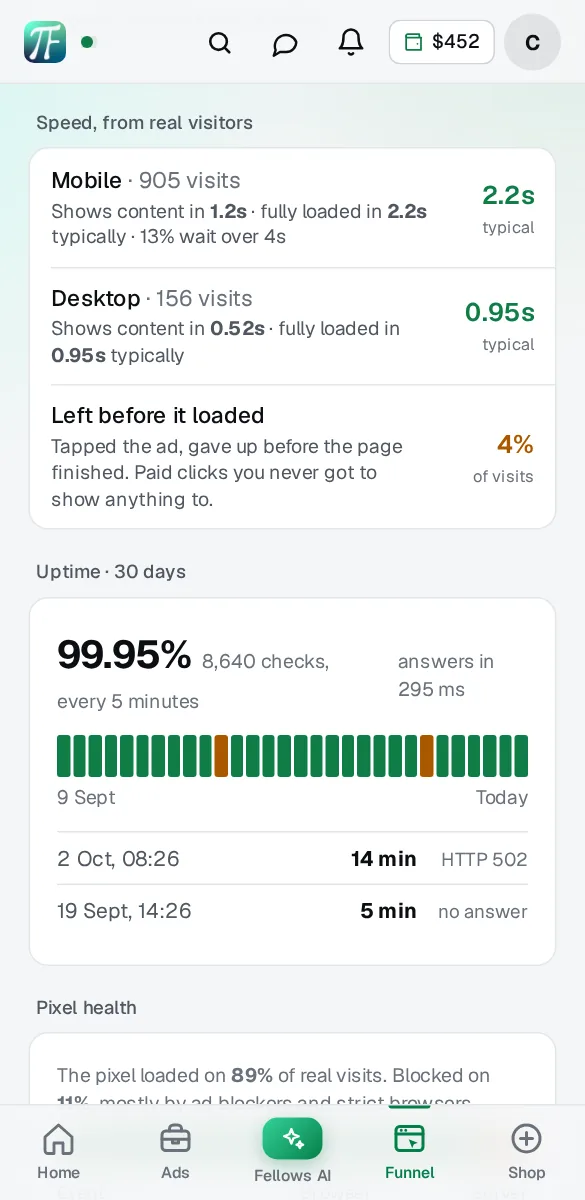
Bring your landing page. We host it on the edge and watch it every five minutes. The Hub shows every ad set’s visits, taps and joins, the share of its traffic that looks automated, how fast the page loads on real phones, and the pixel events an ad blocker would have cost you.
- Your page, on your own domain
- Checked every 5 minutes
- Free to build and preview
A page on your own.
Or one that is watched.
On your own
You hope it is up.
 Ads Manager
A page you hope is up.
With your fellow
Your fellow watches.
 Your fellow, 02:15
- 1You upload your page
- 2Your fellow hosts and watches it
- 3You see visits by ad set
Up, watched, counted by ad set.
Sample data
What you get
Tap one and the sample above shows it.
What Ads Manager doesn’t show you
Ads Manager counts the click. What happens next is on your page, and most of it never reaches Meta: the visitor who gave up before the page loaded, the data-centre traffic an audience network placement sent, the phone with an ad blocker where your pixel never fired.
Each of those is a paid click that looks like a visit and behaves like nothing. Averaged across a campaign they disappear. Split by ad set they point straight at the one to fix.
How it works
- Upload your pageA zip, the files, or import it from where it lives now. We check it, approve it, and it goes live on your domain with one DNS record.
- Tag your ads onceThe Hub gives you one line of URL parameters. Paste it into each ad’s tracking field and Meta fills in the campaign, ad set and ad names by itself.
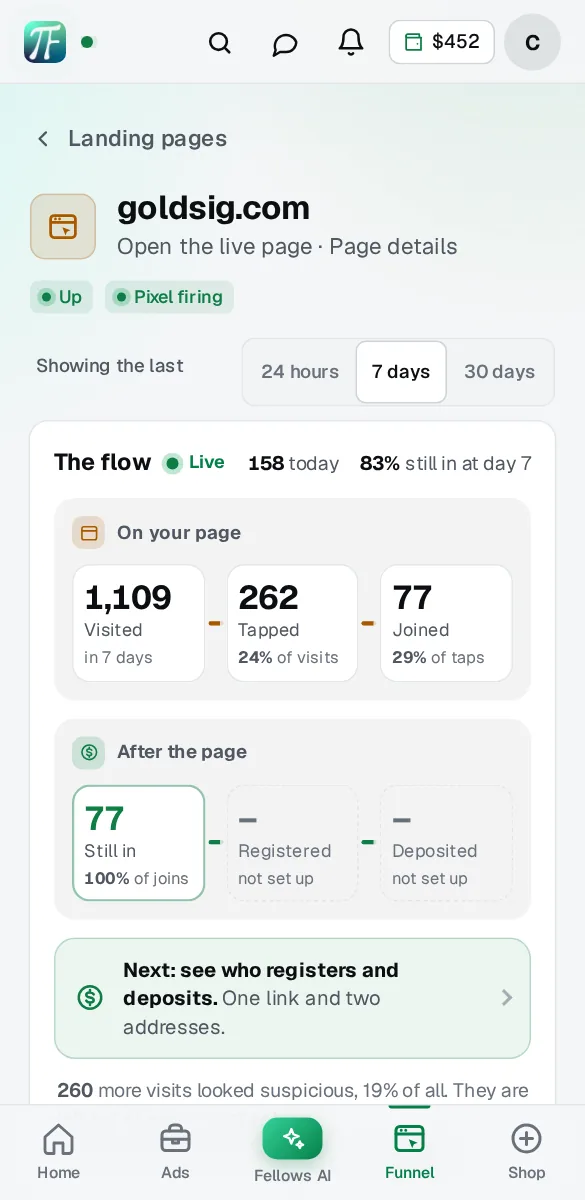
- Read it by ad setVisits, CTA taps, leads or Telegram joins, suspicious share and countries, per ad set, for the last 24 hours, 7 days or 30 days.
- Get told when something slipsThe page stops answering, the pixel goes quiet, or one ad set starts sending suspicious traffic: you hear it on Telegram or push first.
What you actually
get to look at.
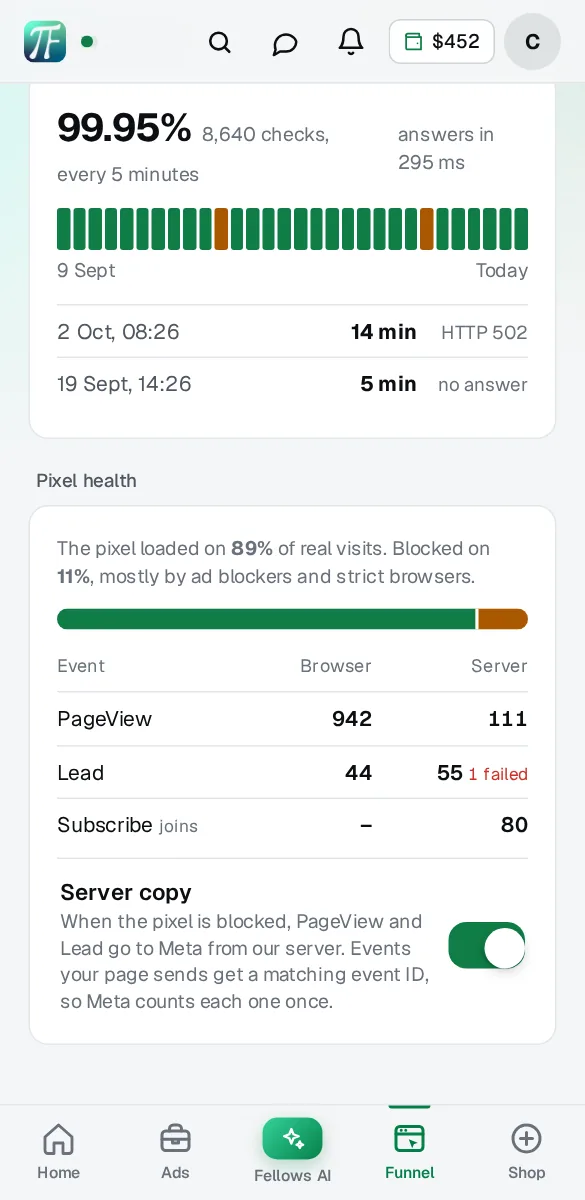
Real screens from Pages in the Hub, on sample data.
Suspicious, and why we say it that way
No tool can prove a visit is fake, so the Hub doesn’t pretend to. It flags a visit as suspicious when it shows one of three plain signals, and shows you which one.
Two kinds of traffic are deliberately left alone. iPhone users on iCloud Private Relay arrive through large network providers and are real people, so they’re never counted as data-centre traffic. Meta’s own review and preview visits are counted apart and left out of every number, so they don’t dilute your rates.
Blocked pixels, recovered
On a share of phones the Meta pixel never loads: ad blockers, strict browsers, privacy settings. Those visits still cost you, and Meta never hears about them. The Hub measures that share on every page and, with your Conversions API token saved, sends what was lost from our server.
What you see
What we keep, and for how long
No cookies of ours. No IP addresses stored: only a salted fingerprint of network and browser, used to spot the same device coming back. Visit records are kept for 45 days, then deleted. The only thing sent anywhere is what goes to your own pixel.
The limits, plainly
It reads pages we host, because the tracking is built into them. Ads without the URL parameters still count, filed under “No ad set tag”. Suspicious is a signal, not a verdict: a real person on a work VPN can land in it, and a careful bot on a phone network can miss it. Some phones don’t report every timing, so speed is measured on the visits that do. Recovering blocked events needs your Conversions API token.
Questions about Page Fellow
What is Page Fellow?
Page Fellow is landing page hosting inside the TradingFellows Hub. You bring your own page, it runs on your domain, and every visit, tap and join is shown per ad set, with suspicious traffic flagged. Each version you upload keeps its own numbers, and the page is checked every 5 minutes.
Do I have to change anything in my ads?
Paste one line of URL parameters into each ad’s tracking field. The Hub gives it to you with a copy button. Meta fills in the campaign, ad set and ad names itself.
Is suspicious traffic the same as fake traffic?
No. It means a visit showed a clear signal: a data-centre network, an automated browser, or the same device four or more times in a day. The Hub shows which, so you can judge the ad set yourself.
Will the server copy double count my events?
No. Every event sent from both the browser and our server carries the same event ID, and Meta keeps one. When the pixel is blocked, only the server copy exists.
Does it slow the page down?
No. The script is a few kilobytes, loads after the page and sends tiny beacons in the background. If it fails, the page works exactly the same.
Can I see joins to my Telegram channel per ad set?
Yes, with Channels. Link your channel and each ad set shows its joins and how many are still in after 7 days, next to its visits and taps.
How am I told when something breaks?
On Telegram or push, whichever you switched on in the Hub: the page stops answering, the pixel goes quiet for a day, or an ad set sends 40% or more suspicious traffic.
Who builds the page?
You do, or whoever builds for you. Upload it in the Hub or import it from where it lives now. We check it, approve it and host it, and every new version you upload keeps its own numbers.
What does it cost?
Building and previewing your page is free. Putting it live is part of your fellow, with Magic Fellow and Channel Fellow, for one monthly price shown before you pay.
Free to build. Live with your fellow.
Build and preview your page free. It goes live with your fellow, next to Magic Fellow and Channel Fellow.
One Hub, one balance, six products.
Each one works by itself. Together they are the whole run of an ad: written, checked, paid for, tracked and improved.
Find the ad set that sends real people.
Free to build and preview. It goes live with your fellow.